AP Computer Science Principles Summer Institute 2020

June 29-Jul 2, 2020 @Molloy College with Jill Westerlund

pre-COVID: I took a one-day AP workshop in January with Jill to help me teach AP Computer Science Principles more effectively. It’s my first year teaching, and I mostly went along with the flow of relying on CodeHS as the vehicle to deliver the instruction.

I was wrong to do this. While CodeHS is an excellent tool to help teach the content, I should have crafted something much more meaningful. I’m pretty sure my one section of students were aware to the fact that it wasn’t really such a great experience on their end (and on mine). I did the homework assigned along with the students, and it really was a lot. The short video clips, while informative, did not help further the understanding into a deeper, more intuitive level.

[June 29-Jul 2, 2020]

During #MERIT18, we all experienced the drinking from the firehose moment of just having so much given to us. These four days were definitely THAT. On top of that, I signed up thinking 8:30am-4:30pm wasn’t such a bad schedule to do Monday-Friday. I thought, that it could probably be helpful in getting ready for the school year. Folks, here’s where I tell students the importance of reading AND comprehending: 8:30am-4:30pm EST. I’m over here living my life in Pacific Time, and it didn’t occur to me that I would be doing this 5:30am-1:30pm.

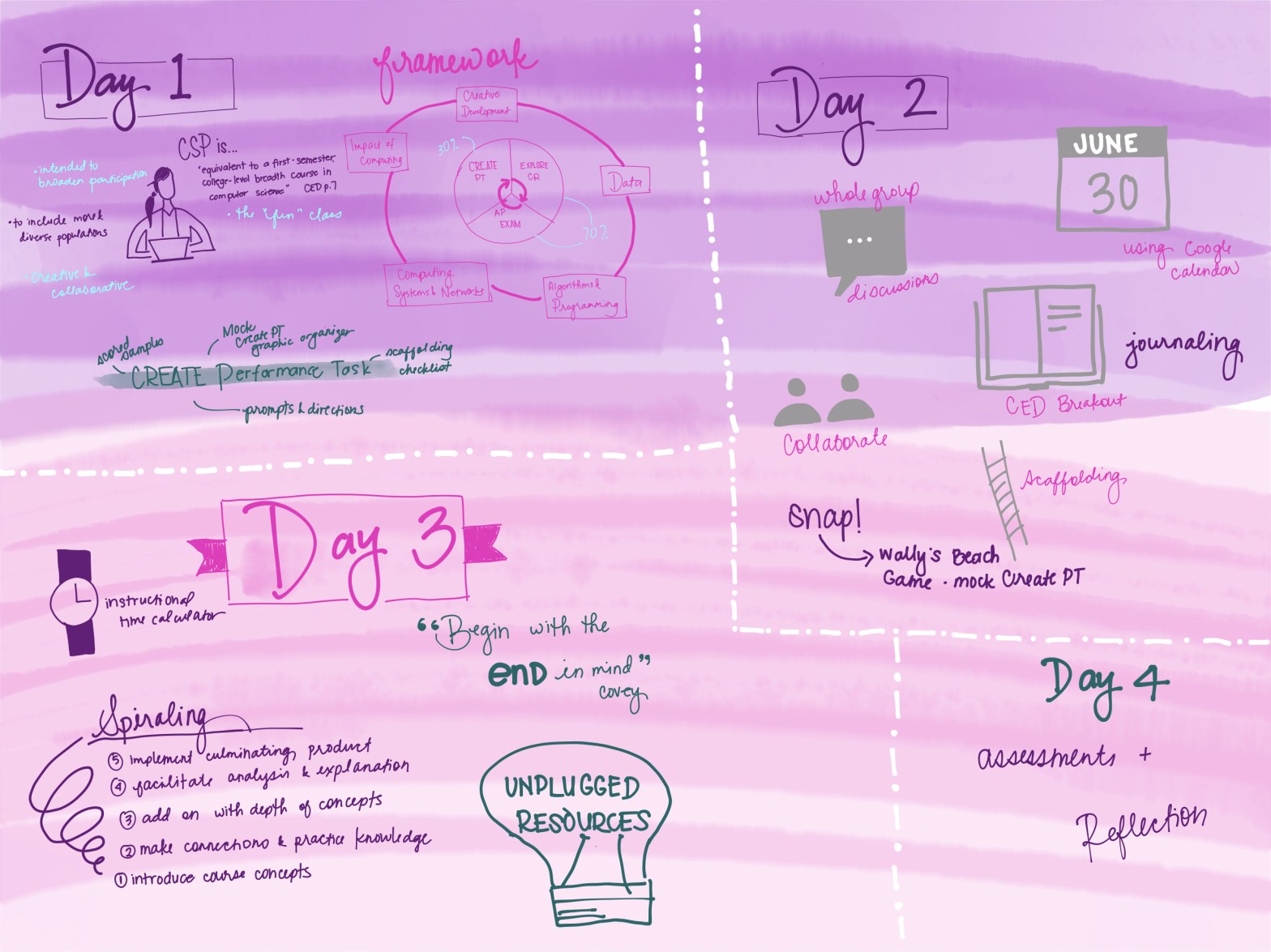
Day 1: June 29Course & Exam Description

Jill gave us a wealth of information on the first day. We talked about the new binder we all got in the mail + conceptual framework + Computational Thinking Practices (CTP) + Big Ideas + new requirements. So yes, there was a lot of information. I’m looking over my notes, and it looks like there are a ton of holes I need to fill in. My favorite part of this day was getting a list of the vocabulary Jill uses that were pulled out from the CED and how to think about the Create PT directions. As a group, we created a list of some requirements and tips on approaching the Create PT.

Day 2: June 30- Teaching- Create PT

We went through the new format for Create PT by completing a mock Create PT. We coded together using Snap! and then went into breakout rooms to fill out the graphic organizer provided as a group. This is where I had come to Jesus moment about being more involved in teaching programming (and not relying on CodeHS to do it for me). There would be a heavier emphasis on procedural abstraction and technical writing. When I learned to code, it was mostly like playing an instrument by ear. I could figure stuff out for the most part, but I didn’t have the language to go with it. Now, here I am teaching music theory (so to speak) without the vocabulary. I will be working on this so that I can help the students with their technical writing more effectively.

Day 3: July 1- Planning & Teaching

We unpacked the Conceptual Framework together and took a hard look at what was necessary in the course (and which lessons could be thrown out). Because we’re teaching in a blended schedule, I only see the CSP students once a week. Eek! This means our in-person (if we ever go back to being F2F) will need to be valued even more. This also means I may have to create my own videos for the students in explaining what’s happening in their programs.

Jill showed us how to lesson plan using Google calendar. While it might initially be not so exciting thing to say, SEEING the units on the calendar made it very clear how to approach the course. She’s sold me forever in using the calendar to do my lesson planning rather than trying to come up with some other cute template that I’ll only use for part of the year. However, I look at my calendar EVERY.SINGLE.DAY.

Day 4: July 2- Assessing Student Progress

Jill presented assessment syntax that I whole-heartedly appreciated. The rest of the group gave ideas jumped in and we started building ideas of how we can assess students. I think at some point here, I definitely spaced out. I wrote down a lot of stuff and I see all the notes, but I do not have a recollection of what happened.

KEY TAKEAWAYS:

  • interactive journals- when I taught middle school, I used to have my students keep a math and science interactive notebook. Students would come back and tell me how it’s basically their survival guide to high school science and algebra. I will need to figure out a way to use this for computer science
  • unplugged activities- Teaching at a 1:1 school, I have zero worries about our digitally native students learning how to use their tools. However, I have found it challenging to teach them without their devices. I will need to include more teaching time away from their devices and interacting with each other.

Teachers Pay Teachers

Today, I opened up my “store” on Teachers Pay Teachers (TpT) at the suggestion of my department chair after sharing something I made with him. The suggestion made to monetize my work is a great idea. My boyfriend thought it was a brilliant idea after I explained TpT. He was surprised that I wasn’t selling the stuff I’ve made already. However, I have mixed feelings about it.

  1. I’ve purchased lesson plans and unit bundles on TpT as a starting point when I absolutely had no clue where to start. It helped me and I’m glad I could help someone. BUT…
  2. When I couldn’t afford TpT materials, it forced me to make my own or be creative. It got to a point in my teaching career that I could stop purchasing ideas from TpT and start making my own.

Anyway, I thought I’d try it out and see how it goes. I don’t have much of a following as it is, but we’ll see! Check it out!

TpT- Learning with Miss Medrano

Teacher Appreciation 2020

It’s Day 51 of shelter-in-place here in the Bay Area. Traffic has reduced travel time from my home to work by about 30 minutes. We line up to go to get inside the grocery store. The bottom half of everyone’s faces are covered. People are losing their jobs….and…

Teachers are teaching…or not.

I’ve definitely heard people tell me that teachers should not be paid while we are sheltering-in-place because they’re not actually teaching. Teacher friends have reported that they’re receiving complaints from providing too much, too little, and everything in between. Parents who are also teachers are managing their class of 30 or 150 students while getting their own children to get out of bed and do their homework. Regardless of what the perceived situation is, the truth is, teachers are tired.

These teachers are getting up every morning to talk to a computer because students are too shy to come on to camera or they’re on devices that don’t have a camera. They continue to come to class despite the fact that they have been Zoombombed or TikTok pranked every class meeting. Then they go back to their lesson plans to find something fun and exciting for students to do without any immediate feedback. After all of that, they stay up all night to grade assignments and find a new way to offer meaningful feedback.

This is the time of the year we start to miss our kids already, because we’re going to have to say good-bye to them and remind them that they have the tools to succeed in their next adventure. This is the time of the year we hug our graduates just a bit longer in case this is the last time we see each other. We prepare the freshmen for their last physics exam, and try to get out of chaperoning prom. Although no one signed up for this, the teachers all get up every morning to do their job…whether or not you think we should get paid.

I see my colleagues bravely taking on technology even though it scares them. The technologically-confident are patient with us and sharing tech tools with us. I don’t see teachers finger pointing and blaming those who are tech apprehensive.

I am proud of my fellow teachers for fighting through the fatigue everyday. I am inspired by the amount of sharing, collaborating, and cheering each other on through texts, phone calls, and video conferencing. Thank you to all my fellow teachers for keeping it positive despite your own struggles.

Distance Learning Week 4 & 5

We had practice Distance Learning days scheduled for March 11-12, but then the rest of the Bay Area went into Shelter-in-Place around March 16th. The week before Easter Break, the wonderful Mrs. F and I discovered SlidesMania templates. We both thought of using it somehow, but then forgot to tell each other. I thought I’d try it out with my Physics freshmen students. It was the best way to go since our LMS kept crashing due to a sudden surge of users trying to access material all at the same time.

We did Ohm’s Law Lab the week before, which we mostly kept the same. Thank goodness for NSTA in the previous years because we already had it mostly set up so that the students are able to work on the lab pretty independently. This week was just pretty much their practice with using the Ohm’s Law equation and proportional reasoning.

Screen Shot 2020-04-19 at 4.30.02 PM

A lot of the students really enjoyed doing these slides. Here’s a screenshot of one of the student’s feedback. It’s only now that I realized I didn’t edit all the slides’ templates. I am so grateful for SlidesMania.com for creating this template. I took a look at their site, and it looks like they’ve added more templates since I created this April 6-9 slide deck.

If you’re interested, here’s what I created for April 20-24. This begins the exploration of Series & Parallel Circuits. Normally, this part is a lab that students complete in groups. Last year, I had the students complete everything on slides and then create a video instead of writing out their Claims, Evidence, and Reasoning. (One of the feedback from the upper class science teachers is that the students are all CER’d out.)

Mrs. F created a bunch of little videos to accompany the assignments, so I thought I should the same…then I petered out toward the end and ended up using her Wrap-Up videos. Hope you find this useful and enjoy!

4th Quarter- First Day of School

It is the fourth quarter it should be our last sprint towards the finish line. But it isn’t. I’m finding myself making new material in this last quarter. There were assumptions I made about student knowledge, which in retrospect, I really shouldn’t have made any assumptions. This is great practice for me moving forward. Now, I know to go over communication methods and how to use them.

With distance teaching, I decided to create some infographics for students (and others) to use in determining which communication method to use.

Communication Infographic

I was able to create this with input from my colleagues, students, and my awesome family of course. The conversation I had with students greatly reduced the amount of text-like conversations via email. Students also felt more comfortable signing up for video conference.

During our first week of video conferencing, I found new things to state out loud. For example, make sure to sign in with the name that matches my attendance sheet. Students made poor decisions and used extremely charged words as part of their handles. I also had to ask students to wear at least a shirt when chatting with the class. Our school has a dress code, and I considered asking them to be in dress code for the top half. Instead, I used the opportunity to talk about semi-professional dress (especially since I’m doing my classes in an old college hoodie).

Video Meeting Etiquette

I’m sure new things will arise and I’ll make something for it. It looks like making these flyers and baking are my new coping mechanisms as we all #stayhome during the pandemic.

Python Programming Unit (2019)

Day 1- What is Hacking?

teachyourkidstocode
Bryson Payne (Twitter: @brysonpayne) wrote the book we use for class.

In our Making, Hacking, Tinkering class, we have to Hack. I spent my Christmas vacation trying to figure out how to teach programming/come up with activities that suit the gamete of no programming skills all the way to lots of programming skills.

To start, I thought it would be kind of a good entry to explore different kinds of hacking. I was inspired mainly by all the videos floating around in my Facebook and Pinterest accounts. Titles like “15 Phone Hacks” or “Meal Prep Hacks” intrigued me as when did the word hack equate how to be more efficient. So the first lesson, admittedly, was a poorly executed assignment about hacking in the traditional sense vs. what it is now. I’m so embarrassed by this first attempt that I’m not going to even post a link to what it is.

Day 2- Intro to Python

Last year, we used Khan Academy’s Intro to JS: Drawing & Animation computer programming course. Mrs. C and I chose to do so because there were students who were enrolled in Making, Hacking, & Tinkering as well as Computer Science. We were initially going to teach Python using Bryson Payne’s book, “Teach Your Kids to Code” as a start. We had to switch gears when we found out they were going to be learning Python in their other class. But this year, we  discovered that they were going to be using JavaScript as the main language to learn through the CodeHS curriculum. So this year, I spent a while learning Python and figuring out the best way to teach it. To save my sanity, I just broke up the chapters into different lessons for the students.

From my CS session with Sheena Vaidyinathan (Twitter: @sheena1010), I realized the importance of having the students understand where certain terms came from. She stressed how important it was to know Seymour Papert. I mean, we teach the students who Gregor Mendel is in biology, why aren’t we talking about Seymour Papert? Unfortunately, his revolutionary fashion choices of the time period further encouraged certain stereotypes students have about “computer people” (even though we live in the Bay Area!).

Their first program is the traditional, “Hello, world!” Then they went into making MadLibs. Because they are high school students, they could have probably created a story for the MadLib assignment instead of just writing a sentence.

IMG_2352

Days 3 to 20- What is Hacking?

In each of the lessons, I referred to Payne’s book for the order of which the lessons will go. For their programs, the students were making a whole bunch of spirals. As the quarter continued, we had a few questions come up:

  • How can we make turtle move faster?
  • Is there anything else besides lines and circles that we can draw?
  • How can I color the inside of my shape?
  • What colors can I use?
  • Where is my turtle, and how can I make it go to a certain location?
  • What is the coordinate system that turtle uses?

These were all really great questions! One student even took it upon himself to figure out how to code a heart so that he can put it on his Snapchat. This inspired me to create a Valentine’s Day assignment for the students. Doing so showed me that the students didn’t really connect what they were doing with the why. For example, to make a square turning spiral, students had to make their turtle turn 90 + 1 degrees. Keeping it at 90 degrees would create a square spiral. When it came time to make a triangle or pentagonal spiral, it was difficult for students to see that they had to change the amount of degrees the turtle had to turn to respond to the shape. I know how I’m going to improve the assignments for next year. For example, we will move through the spiral series just a touch quicker, and add more information to drawing circles sooner. I would also make the information for the programs

Days ???- Final Project

For their final project, I had students create a program of….who knows! The skills they have are:

  • drawing spirals
  • making lists (and calling it elsewhere)
  • pop-up text and num windows
  • some math functions

Reflection

In the end, my initial goal of all learners loving coding was not met. I need to redo this unit.

Distance Learning Days 1,2,3

Day 1: What To Do…

The day before we went to Distance Learning, I was definitely the one freaking out about what we’re going to do. The other members of the Physics Learning Team kept trying to talk me off the ledge to tell me that it’s just for one class period. I’m thinking that it was more of a DoomsDay situation and it’ll be for more than one class period. And here we are. Luckily, this is the time of the year we go to NSTA so we had quite a few things prepped and ready to go for Distance Learning.

I went to a nearby Starbucks because I couldn’t trust myself to do work at home. Instead of actively working, I people-watched and documented the drama that unfolded before me. I fielded a couple questions, but it was mostly okay. The assignment was to complete a couple readings and then complete a questions similar to one on the test.0d690c0f-5ee4-405d-bd45-db5be16ec75dbc60ad62-6210-4214-a0bf-ff5a0a06297e116f9300-a2a0-4d11-a4ce-16d4568d3015b1407b72-bf71-45a6-82d8-14c20de6a326

At the end of the day, I walked on the treadmill while grading the submitted assignments that day. Walking away some of that anxiety helped a lot.

Day 2: Grades are Due

This time, I took the working hours a bit more seriously because 3rd Quarter grades were due. Because of the rotation, I was still okay with lesson plans. I am slightly more panicked about the Making, Hacking, and Tinkering class since what we do is build in class. The student suggested we complete some CodeHS courses, but I’m not too keen on doing this since it’s not a programming class. I will think about that more. I finished my grades! Woohoo!

My very good friend and awesome colleague Mrs. F came up with Distance Learning Policies for her own class. I took what she wrote and adapted it as my own: Distance Learning Policies. I tried to create one version that would work for all three classes that I teach mostly because I didn’t want to write three different versions. It seemed to work. I asked the students to tell me what they’ll find challenging and another way to organize themselves to stay on top of their assignments. Most of the students are identifying that writing down what’s due and physically crossing it out would be their method of organizing. Others wrote very valid concerns for distance learning that I will be following up on.

I utilize the Remind App frequently to remind students of things such as test dates or when there’s something big due. I reminded them not to work on anything for Physics on Friday since it was a scheduled school holiday.

Day 3: Getting Used To Things…then not…

I’m finally 100% on board with this whole WFH situation. I got up at 5:30am, did some chores, made lunch, got a load of laundry started. Then I sat down and tried to iron out more lesson plans. Today, I’m feeling more like a Help Desk rather than a teacher. I’m fielding questions about uploading images, uploading files vs dragging them, etc. The fun part is I was able to try Google Meet with a student. We were both in messy bun mode, but it’s okay…we’ll call it WFH hairdo.

At about 11:45a, we get the message from our school principal: SF Chronicle: Bay Area must shelter in place. We will get more details about it as information rolls out, but I believe my panicked state at the beginning of our Distance Learning is justified. I just needed some time to make peace with it. But now…what am I going to do? Grateful for all the resources and teacher communities out there! It’ll happen.

But….seriously. Bay Area Communities- we’ll be okay. Just stay home, practice social distancing, and that awesome skill we learned: Wash your hands!

Day 25 Physics: Bowling Balls Day!

Day 1-ish of Forces and Newton’s Laws, Part 1:

Last week, we went to the newly refinished gym to do bowling balls. I told the students how nervous I was to take them up to the gym because I did not want to get this privilege revoked due to us ruining the newly refinished floors. For the most part, students definitely adhered to the behavior agreements we discussed before leaving the classroom. This activity is credited to Noschese (2011) for this awesome activity.

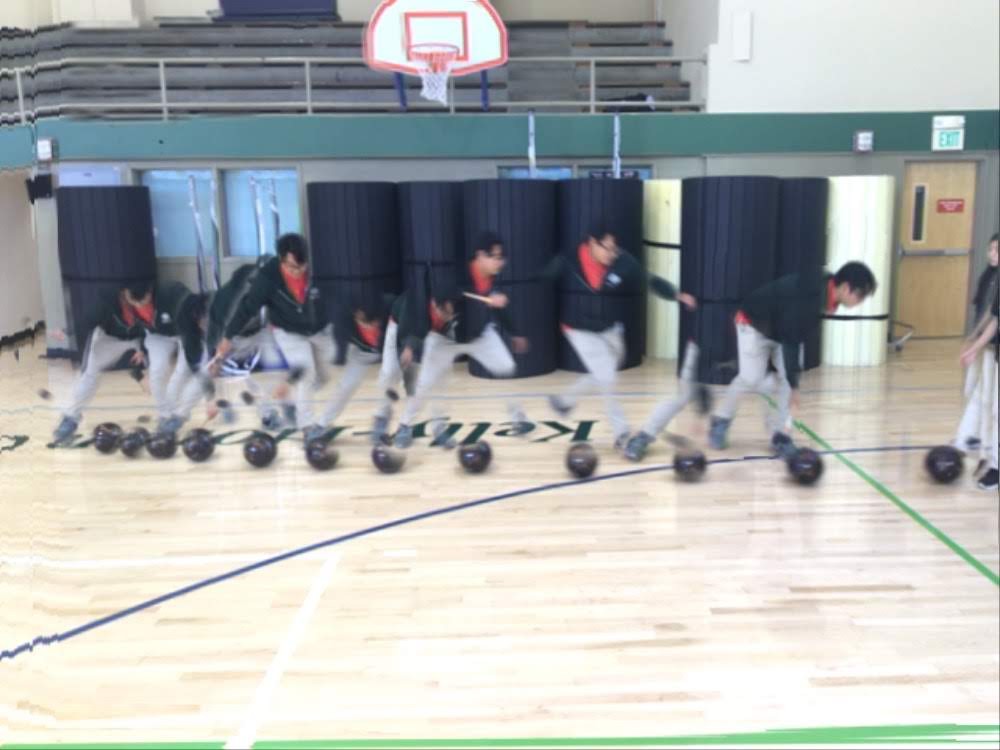
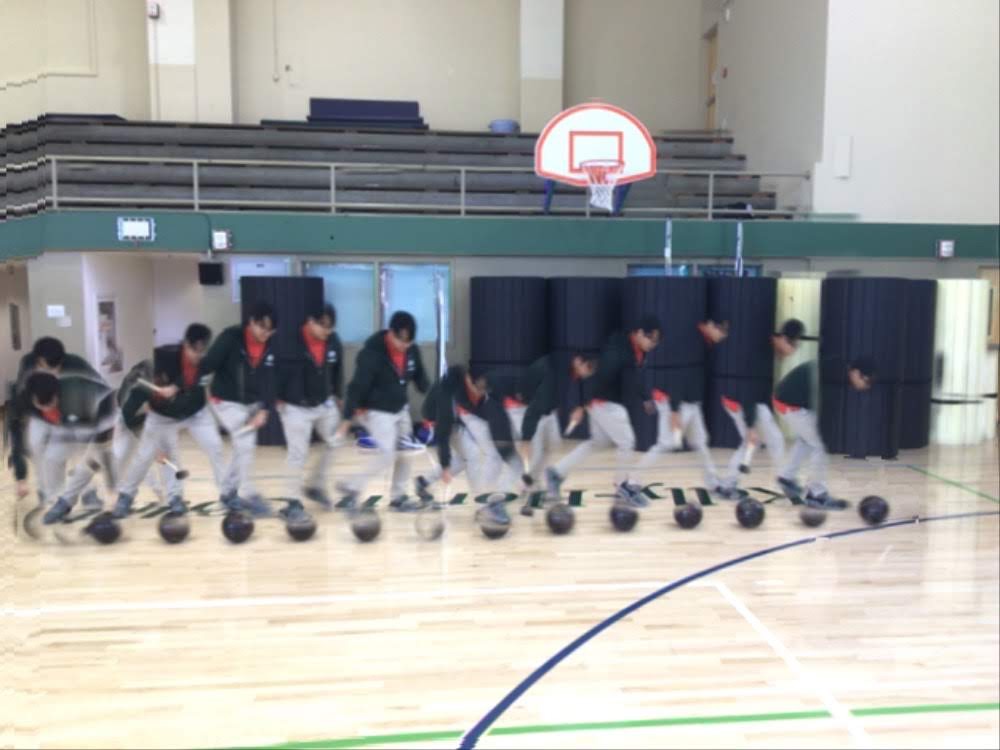
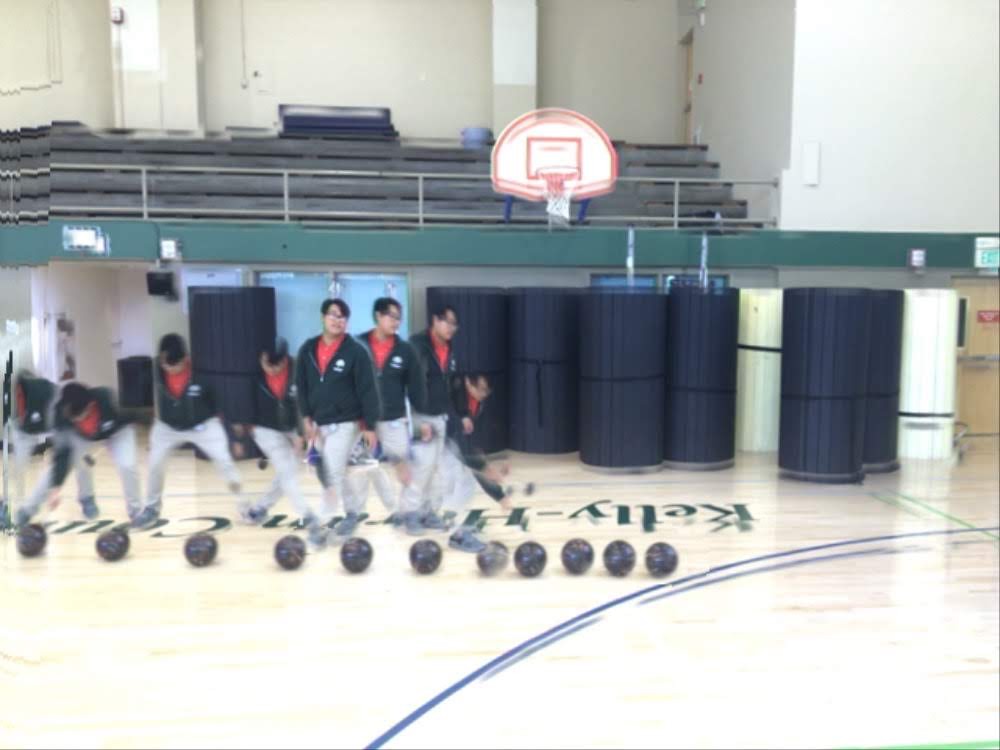
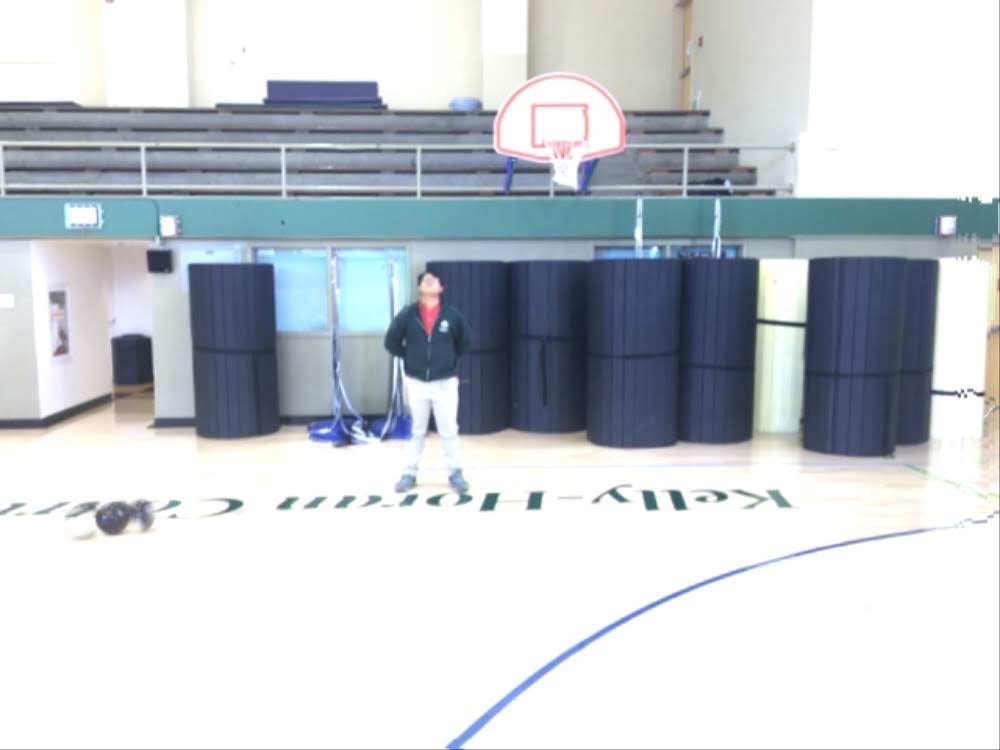
We downloaded the Motion Shot app so that the students can use it to see what they’re doing, but also so that students who have awesome pictures can be seen by the rest of the class! Here are some photos:

img_2690
Block 2 student demonstrating the speeding up. We talked about tapping the ball the same amount of “strength” and the student having to pick up speed to make sure that the ball doesn’t hit the wall or accidentally roll over any feet. 

img_2691
After sharing this photo with the class, I realized that they were trying to show the bowling ball is moving at constant velocity by tapping the ball at the same “strength.” I am realizing that this was an error, and I showed this to the students anyway as an informal discussion of error analyses. 

img_2692
Block 2 student showing how they got the bowling ball to slow down by tapping on the opposite side of the ball’s direction. 

img_2693
Block 2 student showing off that they got the ball (and him) to stand still by not touching it. They also concluded that the gym floors are really “slippery” and didn’t allow the ball to stay still. 


Physics Day 17- Race to Tie

During our planning conversations last year, we talked about adding more lab-based assessments. This year, we added a Buggy Lab quiz, which is a paper and pencil quiz AND we brought back the Constant Velocity Challenge. Most of the team did the Dueling Buggies, which we did when I first started teaching Physics at SHC. After I attended the Modeling Instruction workshop in 2017, I started implementing Race to Tie, which is the same concept, but they’re not trying to collide.

The first year I did it, I think the Ss collected data and then we did the test on the same day. It seemed too crazy, so I thought maybe we can separate it. The students collect and analyze their data one day, and then do the actual test on another day. They were able to finish their write-ups, and I think it’s going swimmingly.

Then, the heat wave hit. It was so incredibly hot in the classroom! As I walked through the halls, I see the teachers and students just dripping in sweat. Block 1 came through, and everyone is focused (because we talked about how this is their test)….and all the buggies have gone haywire. The buggies that were purposefully made slow are now fast, and the buggies with brand new batteries were even faster or slower. Basically, NONE of the buggies were the same velocity.

Still debating on how to grade fairly. I may just add a Reflection piece so that the students get graded fairly on the accuracy of their calculations without punishing them for the buggies going nuts.


2019-20 School Year Resolutions

HAPPY NEW YEAR! 🎉

This year, I’m teaching THREE classes: Physics, Making Hacking & Tinkering (MHT), and AP Computer Science Principles (APCSP). I’m looking forward to learning about teaching a new course. The last couple of years, teaching MHT rekindled my joy for programming. I remember enjoying the coding classes during high school and undergrad. I thought I should take some moments before the school year really gets going to think about some resolutions for this school year.

Resolutions: 

  1. Include more lab-based assessments across all classes. I feel like I did not do a great job of acknowledging the student’s improvement of lab skills throughout the year. It wasn’t until the 4th quarter that the Physics team and I thought we should start including more lab-based questions on our summative assessments. This year, we’ll start from Unit 1!
  2. Be more intentional with assignments. Some situations, I assigned some practices because that is what we assigned the year before. There were some moments where more practice could have been used, but also sometimes the extra practice was a bit overkill.
  3. Improve maximizing class time. There were times when there was a lull in class, and it could have been better used by including a reflection or practice assignment. Although this goal is useful for improving the Physics and MHT courses, this resolution is more for APCSP. I want the students to find their in-class time useful as it will be a hybrid class.
  4. Keep the bus moving. When I attended the NSTA conference in Atlanta a couple years ago, I will never ever forget the keynote, Ron Clark. He presented his book , “Move Your Bus.” In this book, we have to visualize a Flinstone-esque bus (think a vehicle with the holes punched through and human feet keep it moving). Essentially, it was learning how to identify the driver (leaders), runners (positive workers), joggers (workers who don’t push), walkers (getting dragged along), riders (negative nay-sayers). I don’t want to be the rider or walker for my teams or school. Hence, my goal for the year is to keep the bus moving!

Hope everyone out there is having an awesome beginning of the school year season!